
Negative keywords are one of the highest-leverage optimisations in Google Ads — they stop your budget from being wasted on irrelevant queries. HireOtto supports all three levels of negative keyword management: campaign-level, ad group-level, and shared lists. This guide covers each approach and how to use them together effectively.
Negative keyword workflow
A practical workflow looks like this:- Pull the search terms report
- Sort by cost, clicks, or conversions
- Identify irrelevant queries or high-spend zero-conversion terms
- Decide whether each term belongs at campaign, ad group, or shared-list level
- Add confirmed negatives – or remove stale, incorrect, or overly broad negatives from shared lists
- Re-check performance after a few days
Three ways to add negatives
Campaign-level — blocks a term across every ad group in the campaign. Best for broad exclusions that apply to the whole campaign (e.g. “free”, “jobs”, “DIY”). Ad group-level — blocks a term only within a specific ad group. Best for preventing cross-contamination between ad groups (e.g. blocking “product B” keywords in the “product A” ad group). Shared negative keyword lists — a reusable list you create once and assign to multiple campaigns. Best for exclusions you’ll want across many campaigns (e.g. a brand safety list, a competitor exclusion list, or a standard jobs/free-trial exclusion set).Finding negatives to add
The search terms report is the primary source. Pull it for any account or campaign you want to clean up:Adding negatives at the campaign level
For broad exclusions across an entire campaign:- Exact — only blocks that precise query. Most surgical, lowest risk of over-blocking.
- Phrase — blocks any query containing that phrase in order.
- Broad — blocks any query containing all the words in any order. Use carefully — it can block more than you intend.
Adding negatives at the ad group level
For cross-contamination prevention between ad groups:Shared negative keyword lists
Creating a new list
Create a list with initial keywords in one step:Assigning a list to campaigns
After creating a list (or to assign an existing one), get the list ID first:Adding more keywords to an existing list
Reviewing an existing list
Removing keywords from an existing list
Shared negative keyword lists change over time. You may need to remove a keyword that is too broad, no longer relevant, or was added by mistake. HireOtto supports two workflows.Remove directly using keyword text and match type
Specify both the keyword and match type so HireOtto removes the intended entry: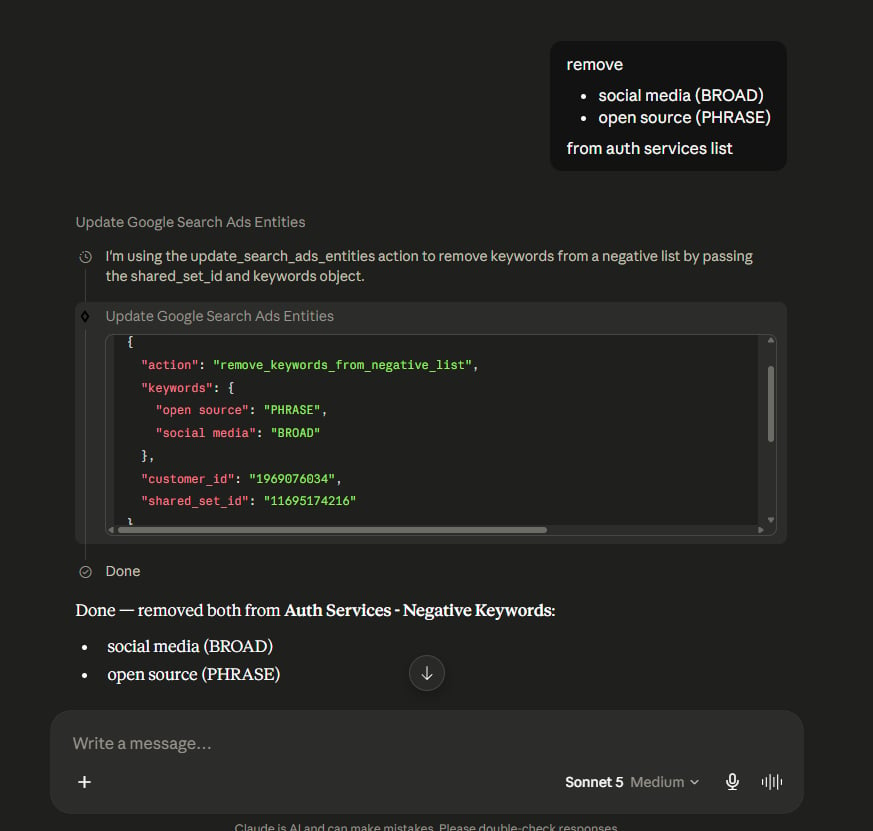
Removing broad- and phrase-match keywords from a shared negative keyword list in Claude.
Review the list first, then remove selected entries
Start by listing the keywords:Typical negative keyword workflow
New account or campaign:- Pull search terms for context (if the account has history)
- Create a shared brand-safety / common-exclusions list
- Assign it to all campaigns
- Add any campaign-specific negatives at campaign level
- Pull search terms report sorted by cost
- Identify wasted spend — zero-conversion terms with significant spend
- Add confirmed wasted terms as campaign-level exact match negatives
- Add any terms that indicate ad group cross-contamination at ad group level
- For terms you’ll want to exclude permanently across all campaigns, add to your shared list
- Periodically review shared lists and remove outdated or overly broad exclusions that may be blocking useful traffic.